


2018 VW Tiguan Allspace Digital Cluster Upgrade Success Case: Installation & OBDeleven Airbag Warning Reset
2018 VW Tiguan Allspace Digital Cluster Upgrade – Real Customer Installation Case
This is a documented 2018 VW Tiguan Allspace digital cluster installation from a real iKAGOO customer in Germany. The case follows the vehicle from the pre-purchase compatibility check through installation, after-sales diagnosis and the customer's final confirmation that the cluster was working correctly.
The vehicle is a 2018 Volkswagen Tiguan Allspace con un 240 PS diesel engine and automatic transmission. Before the order was confirmed, the owner sent photos of the original dashboard and instrument cluster so we could check the actual vehicle configuration.
Final outcome: the new digital cluster fitted correctly and operated in the vehicle. A stored Airbag/SRS diagnostic code that remained after installation was later cleared with OBDeleven. The customer then confirmed that the warning had disappeared and everything was working correctly.
Real video sent during this customer's support conversation, showing the digital instrument cluster installed in the vehicle.
2018 VW Tiguan Allspace Digital Cluster – Real Vehicle Details
| Veicolo | Volkswagen Tiguan Allspace |
|---|---|
| Anno di produzione | 2018 |
| Motore | 240 PS Diesel |
| Trasmissione | Automatic |
| Customer Market | Germania |
| Aggiornamento | iKAGOO VW Tiguan 2017–2022 Digital Instrument Cluster |
| Pre-Purchase Verification | Original vehicle and instrument-cluster photos supplied by the customer and reviewed before purchase |
| Installation Result | Cluster fitted correctly and operated after installation |
| Diagnosi post-vendita | Original PCB checked, connectors checked, vehicle diagnostic code investigated |
| Diagnostic Tool | OBDeleven |
| Risultato finale | Stored Airbag/SRS code cleared and normal operation confirmed by the customer |
About the evidence in this article: the customer video and support confirmation shown below come from the actual customer conversation. Personal identifying information has been removed from the published support excerpt.
Can a 2018 VW Tiguan Allspace Be Upgraded to a Digital Cluster?
In this documented customer case, the correct iKAGOO digital instrument cluster was successfully installed in a 2018 Volkswagen Tiguan Allspace.
But a VW Tiguan digital cluster retrofit should not be treated as a universal screen that fits every car simply because the dashboard looks similar.
The instrument cluster communicates with the vehicle's existing electronics, and for this type of VW upgrade the original instrument-cluster PCB/mainboard is retained.
That is why this case started with the customer's actual vehicle information and original cluster photos rather than only a model-year selection.
The Complete Customer and After-Sales Process
The strongest part of this case is not simply that the digital cluster was installed.
It shows exactly what happened before purchase, what happened after installation and how technical support continued until the customer confirmed the final result.
Customer Asked Whether the Digital Cluster Would Fit His Tiguan Allspace
The customer contacted iKAGOO with the vehicle details: 2018 VW Tiguan Allspace, 240 PS diesel, automatic transmission, Germany.
Instead of confirming compatibility from the model name alone, we asked the customer for photographs of the original dashboard and instrument cluster.
The customer then supplied the original-cluster photographs through the same support conversation.
The Original Cluster Was Reviewed Before the Product Was Selected
After reviewing the customer's actual vehicle photos, the vehicle was matched with the VW Tiguan 2017–2022 Digital Instrument Cluster .
The customer was also provided with the Guida all'installazione del quadro strumenti digitale della Volkswagen Tiguan MQB so the retrofit procedure could be reviewed.
This matters because vehicle electronics should not be selected only from a product photo or dashboard shape.
The Customer Installed the Cluster and Confirmed the Fitment
After receiving and installing the digital instrument cluster, the customer reported that the cluster fitted correctly and the unit was working.
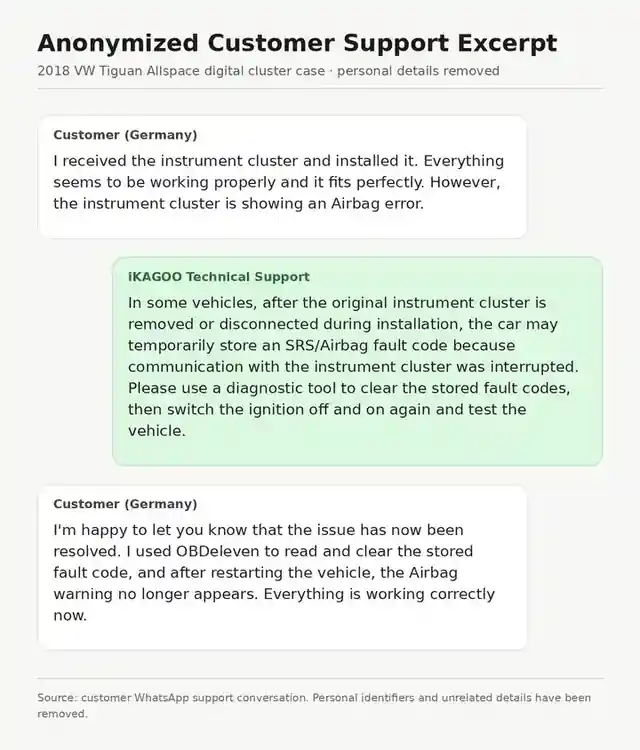
“Everything seems to be working properly and it fits perfectly.”
Customer installation feedback, September 7This was an important result: the product version selected during the pre-purchase check physically matched the vehicle and the cluster was operating.
One Warning Still Needed to Be Diagnosed
Although the new cluster was installed and operating, the customer reported an Airbag/SRS warning on the instrument display.
At this point the important distinction was that the digital cluster itself was already working.
The next step was therefore to check the installation and vehicle diagnostics rather than immediately label the replacement hardware as defective.
iKAGOO Asked the Customer to Recheck the Original PCB and Connections
For this type of Volkswagen digital cluster installation, the original instrument-cluster PCB/mainboard must remain correctly installed in the new assembly.
The customer was therefore asked to check:
- The position of the original PCB/mainboard
- The plugs and cluster connectors
- Whether every connection was fully seated
These checks were completed before moving to the next diagnostic stage.
The Customer Rechecked the Hardware — The Cluster Still Worked Normally
The customer rechecked the original mainboard and connections.
The Airbag warning was still present, while the other instrument-cluster functions continued to operate.
This narrowed the troubleshooting path: the hardware installation had already been checked, so the next step was to investigate the vehicle's stored diagnostic information.
The Engineer Recommended Reading and Clearing the Stored Vehicle Code
Technical support advised using a proper vehicle diagnostic tool to read the stored fault information.
During electronic retrofit work, temporarily disconnecting the original cluster can interrupt communication with the vehicle and leave a stored SRS/Airbag diagnostic code.
A stored code does not automatically mean the replacement digital cluster has a hardware fault.
The recommended next step was:
- Read the stored vehicle fault codes.
- Clear the relevant stored SRS/Airbag code.
- Switch the vehicle off.
- Restart the vehicle.
- Check whether the warning returned.
The Customer Cleared the Stored Code
The customer used OBDeleven to read and clear the stored fault code.
After the vehicle was restarted, the Airbag warning disappeared.
The digital instrument cluster did not need to be replaced. The same unit remained installed in the vehicle.
The Customer Confirmed That the Issue Was Resolved
The customer then confirmed that the stored fault had been cleared successfully, the Airbag warning no longer appeared and the vehicle was operating correctly.
“I used OBDeleven to read and clear the stored fault code, and after restarting the vehicle, the Airbag warning no longer appears. Everything is working correctly now.”
Final customer confirmation, September 20Real Customer Support Confirmation
The image below is an anonymized excerpt from the actual customer support conversation.
Customer identity, phone number and unrelated private information have been removed, while the relevant technical confirmation is retained.
Why the Customer Video Matters
A catalog photo can show what a product is supposed to look like. The video at the top of this case is different: it was supplied by the customer during the actual support conversation.
It gives a potential buyer direct visual evidence that the digital instrument cluster was physically installed in the customer's Tiguan Allspace.
Together with the compatibility discussion, installation feedback and final customer confirmation, it creates a more useful evidence chain than a product image alone.
Final Result: Successful Installation and Completed Support
The cluster fitted correctly and operated after installation.
When an Airbag/SRS warning remained, the original PCB and connectors were checked first. The troubleshooting then moved to the vehicle diagnostic system.
The stored code was cleared with OBDeleven, the warning disappeared and the customer confirmed that everything was working correctly.
No replacement digital cluster was required.
What This Case Shows About After-Sales Support
Automotive electronics are different from ordinary consumer electronics. A successful installation depends on both the replacement hardware and the vehicle it communicates with.
That makes the support process especially important.
Compatibility Was Checked Before the Sale
The customer sent original vehicle and cluster photos before the product was confirmed.
The Installation Was Followed After Delivery
Support did not finish when the package arrived. The customer's installation feedback was reviewed after the cluster was fitted.
Hardware Was Checked Before Assuming It Had Failed
The original PCB/mainboard and cluster connections were checked before the troubleshooting process moved to vehicle diagnostics.
The Support Route Changed as New Information Became Available
When the hardware checks did not remove the warning, the next step was reading and clearing the stored vehicle code.
The Case Continued Until the Customer Confirmed the Result
The case did not end with a troubleshooting suggestion. The final result was confirmed after the diagnostic reset.
What Should You Check Before Buying a VW Tiguan Digital Cluster?
If you are considering a VW Tiguan digital instrument cluster, digital cockpit or virtual cockpit retrofit, do not choose only from the product photo.
Before ordering, confirm:
- Your exact vehicle model
- Anno del modello
- Country or market
- Configurazione con guida a sinistra o con guida a destra
- Original instrument cluster appearance
- Original cluster label or part number when available
- Whether the original PCB/mainboard needs to be retained
- Whether installation instructions are available
- Whether technical support continues after delivery
The goal is not simply to find a screen that looks compatible. It is to confirm the correct retrofit route before the installation begins.
Frequently Asked Questions About the 2018 VW Tiguan Allspace Digital Cluster
Can a 2018 VW Tiguan Allspace be upgraded to a digital instrument cluster?
Yes. In this documented customer case, an iKAGOO digital instrument cluster was successfully installed in a 2018 Volkswagen Tiguan Allspace in Germany. Individual vehicle compatibility should still be checked before shipment.
Did iKAGOO check the vehicle before the customer bought the cluster?
Yes. The customer provided the vehicle details and original instrument-cluster photos before the correct product version was confirmed.
Does the original VW Tiguan instrument cluster PCB need to be retained?
Yes. For this type of Volkswagen digital cluster upgrade, the original instrument-cluster PCB/mainboard is retained and installed inside the new digital cluster assembly.
Did the digital cluster fit the customer's 2018 Tiguan Allspace?
Yes. After installation, the customer reported that the unit fitted correctly and was working.
Why did an Airbag warning remain after installation?
The hardware installation was checked first. The remaining warning was then handled through vehicle diagnostics. The customer ultimately cleared the stored SRS/Airbag code with OBDeleven, after which the warning disappeared.
Did the customer need another digital cluster?
No. The same cluster remained installed. The stored vehicle fault code was cleared and the customer confirmed that everything was working correctly.
Does every VW Tiguan digital cluster installation require OBDeleven?
No. OBDeleven was used in this individual case to deal with a stored diagnostic code. It should not be treated as a mandatory requirement for every Tiguan installation.
Can iKAGOO check my VW Tiguan before I order?
Yes. Send the vehicle model, year, country, left-hand-drive or right-hand-drive configuration, and clear photos of the original dashboard and instrument cluster. A cluster label or part number is useful when available.
Want to Confirm Your VW Tiguan Before Ordering?
If you have a Volkswagen Tiguan or Tiguan Allspace and are considering a digital instrument cluster upgrade, send us:
- Modello di veicolo
- Anno del modello
- Country
- Guida a sinistra o guida a destra
- A clear photo of the original instrument cluster
- A clear photo of the dashboard
- The original cluster label or part number, if available
We can review the vehicle information before shipment and confirm the appropriate product route.
Prodotto: VW Tiguan 2017–2022 Digital Instrument Cluster
Guida all'installazione: How to Install Volkswagen Tiguan MQB Digital Cluster 2017–2022








Add comment
Devi essere connesso per inviare un commento.