
















Guida all'installazione del quadro strumenti digitale della VW Passat 2005–2018
Questo Passat B6 digital cluster install guide support B7 CC (PQ platform) is a step-by-step tutorial for vehicles originally equipped with a mechanical (analog needle) instrument cluster. It covers required pre-install settings, optional rear PCB transfer, USB cable routing, fuel tank capacity calibration, and key PQ settings that may affect turn signal indicators.
- Passat B6: 2005–2011
- Passat B7: 2012–2016
- Volkswagen CC: 2013–2018
Panoramica del prodotto
- Non-destructive installation: designed for a clean retrofit around the instrument cluster area. No drilling, no wire cutting. In most cases, it can be completed without flashing the vehicle ECU or altering factory vehicle data.
- Linux-based stability: built on a Linux platform with long-term focus on VW platform applications. Fast boot performance (around a few seconds) and smooth daily operation emphasis.
- 10.3" HD display: 1920×720 resolution with built-in VW/Audi-style UI themes and support for factory steering wheel controls (depending on vehicle configuration).
- Vehicle info & smart features: phone screen mirroring, multi-language, unit settings, driving mode display (depending on vehicle), warning indicators and vehicle messages, and OTA update capability.
- Critical info retained: the design is intended to keep key warnings and vehicle status information visible (not hidden), supporting safer driving.
- OEM-fit look: 1:1 housing replication aiming for factory-style appearance and a tight fit with the dashboard.
Quality & Reliability Test Summary
The cluster has been validated through functional and reliability checks commonly used for in-vehicle electronics. The table below summarizes test items, conditions, and results.
| No. | Articolo di prova | Test Condition | Risultato |
|---|---|---|---|
| 1 | Basic function verification | Step-by-step confirmation of core functions | PASSO |
| 2 | Intervallo di tensione di funzionamento | Normal operation within 9V–16V input | PASSO |
| 3 | Surge test | High-frequency surge test + low-frequency surge test | PASSO |
| 4 | Power fluctuation simulation | Simulated vehicle power variation | PASSO |
| 5 | ESD (electrostatic discharge) | Air discharge: 25 kV (power OFF), 10 kV (power ON) Contact discharge: 15 kV (power OFF) |
PASSO |
| 6 | Low-temperature storage | Stored at -40°C for 48 hours | PASSO |
| 7 | Low-temperature operation | Operated at -30°C for 24 hours | PASSO |
| 8 | High-temperature operation | Operated at 70°C for 24 hours | PASSO |
| 9 | High-temperature storage | Stored at 85°C for 48 hours | PASSO |
| 10 | EMI resistance (walkie-talkie interference) | No interference observed while the walkie-talkie is transmitting | PASSO |
| 11 | Repeated power on/off cycling | 1,000,000 power cycles | PASSO |
| 12 | Software stress test | Continuous CAN data load test | PASSO |
| 13 | DDR / Flash read-write stress test | Read/write endurance test for memory components | PASSO |
Important Notes (Read Before Installation)
Questo VW Passat B6 B7 CC digital cluster installation guide (PQ platform) applies only to vehicles originally equipped with a mechanical analog instrument cluster. Right-hand drive (RHD), diesel, and some special variants may be supported depending on vehicle configuration.
- Match the original cluster style: If your factory analog cluster looks the same as the one shown in the video, compatibility is typically expected. Always compare bezel shape and connector layout.
- ESD protection: Before handling the PCB, discharge static (wash hands + touch grounded metal such as a metal water pipe). Hold the PCB by the edges; avoid touching electronic components.
- Do not remove the factory buzzer/speaker: The original instrument cluster buzzer/speaker must remain installed. Removing it may trigger an instrument cluster fault or warning.
Installation Video Steps (PQ Platform)
Winter Tire Warning & Speed Warning Settings
Optional Rear PCB Transfer (High-Spec Analog Clusters)
- If missing when required: fuel level may be inaccurate and the cluster may show fault warnings.
- If your original cluster does not have it: you can skip this step.
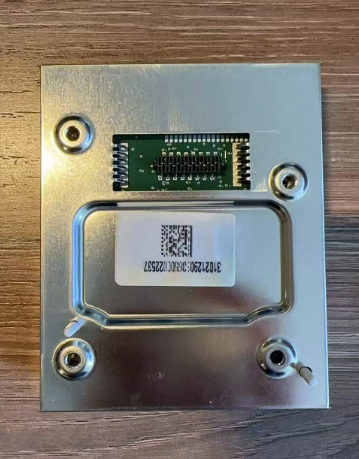
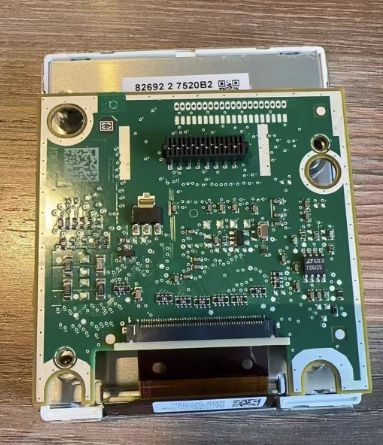
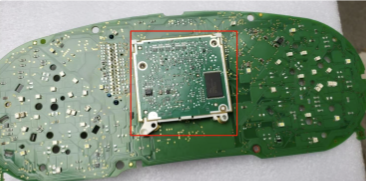
Video principale di installazione
USB Cable Routing (Upgrade USB + Screen Mirroring USB)
- Aggiornamento USB (for firmware updates)
- Screen Mirroring USB (for phone mirroring)
Fuel Gauge Calibration (Fuel Tank Capacity)
Fuel calibration is a common step in a VW Passat B6 B7 CC digital cluster installation guide (PQ platform), especially after the first full refuel.
If the fuel gauge does not show “Full” after filling the tank, calibrate the fuel tank capacity:Fill up and drive briefly
Fill the tank completely, then drive a short distance (a few hundred meters).
Find the refuel/addable amount
Vai a Driving Data → Refuel Amount (Addable / Refillable Amount) and note the value shown.
Enter the value into Fuel Tank Capacity
Vai a Impostazioni → Configurazione Calibrazione → Capacità serbatoio carburante and enter the value you recorded.
After saving, the “Refuel Amount” should become 0, and the gauge should indicate Completo.
PQ Settings Warning — Do NOT Enable “Physical Lights”
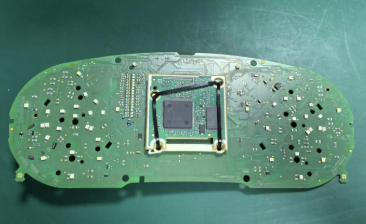
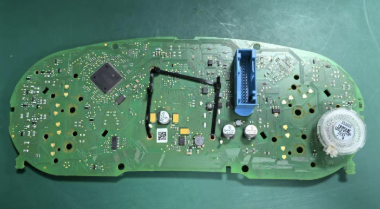
Mainboard / Cluster Core Retrofit Reference
Vehicle Model Selection (Car Icon Mismatch)
This guide is intended as a practical VW Passat B6 B7 CC digital cluster installation guide (PQ platform). By following the correct pre-settings, installation steps, and calibration procedures, most common issues such as fuel gauge inaccuracy or missing turn signal indicators can be avoided.





Add comment